PokéBonk Level-Up Guide: Moves, Enhancements & Vitamins
What each level-up card does and how to read it.
Quick answer
A level-up offers a new move, an enhancement or a vitamin; pick with the mouse or keys 1–3. Each card shows the exact change, and Tab opens your team without closing the choice.
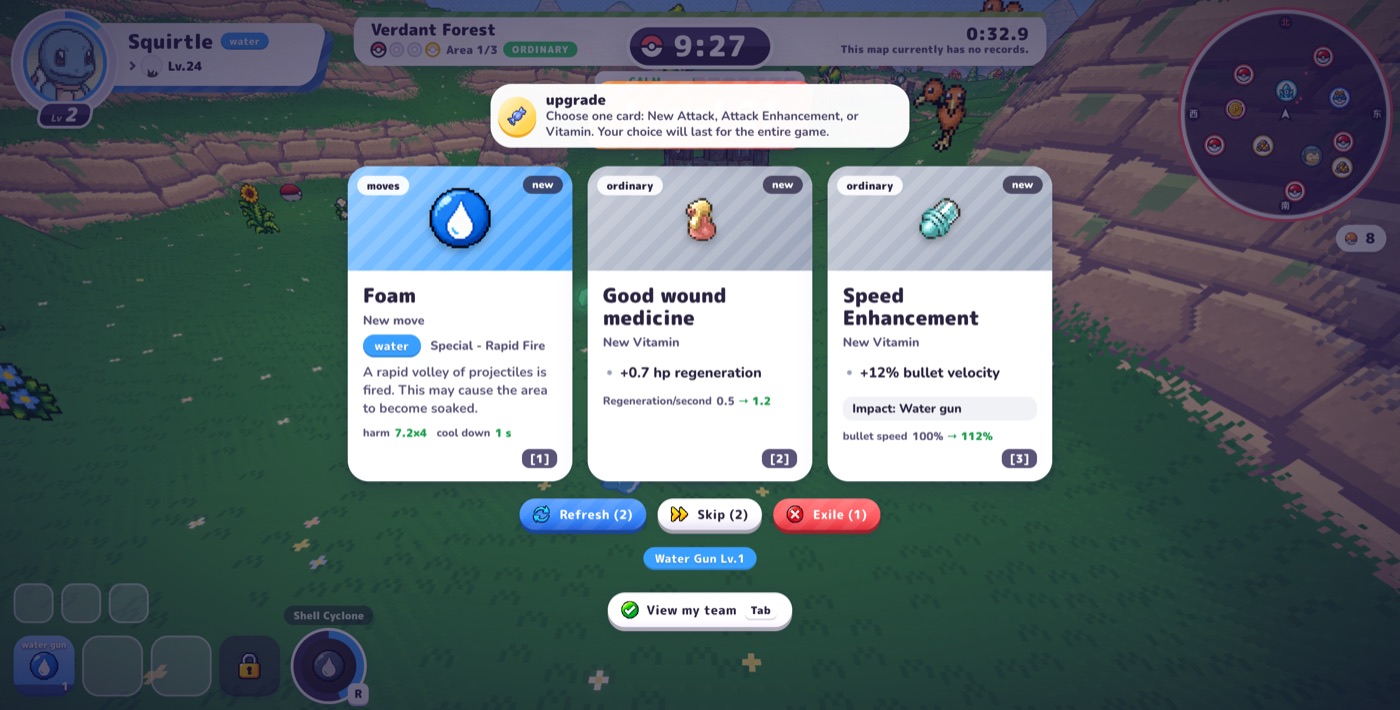
What are the three kinds of card?
| Card | What it does | Example from our run (v0.7.2) |
|---|---|---|
| Moves | A new attack | Foam: water special rapid fire, 7.2 × 4 damage, 1 s cooldown, chance to soak |
| Enhancements | Improve a move you already have (damage, speed, penetration, cooldown…) | Foam damage / speed enhancement |
| Vitamins | Global stat boosts | Good wound medicine: regeneration 0.5 → 1.2 per second. Speed Enhancement: bullet velocity 100% → 112%, “Impact: Water Gun” |
How do I know what a card will do?
- The level-up screen explains the actual change (old value → new value). Official, Patch #7.
- Cards, items and the shop list which moves they affect (“Affects: …”) and the cap of each vitamin or item. Official, Patch #2. Under each vitamin in the pause menu you also see which moves it affects. Official, Patch #3.
- Move cards show real damage with your current stats, cooldown, range, status effects, level 1–8 scaling and item/vitamin modifiers. Official, Patch #7.
- “See all its moves” lists every move with filters for type, physical/special and attack shape, and sorting by damage, cooldown, range or level. Exclusive and evolution moves are marked. Official, Patch #7.
What do Refresh, Skip and Exile do?
Three buttons sit under the cards, each with a counter — on our first level-up they read Refresh (2), Skip (2) and Exile (1). Observed, v0.7.2. Refresh redraws the cards and Skip takes none; Patch #2 refers to “banishing” an option, which we take to be Exile. We did not test what Exile removes or how the counters are earned, so check the in-game text.
Can I check my build during a choice?
Yes. Press Tab for “View my team” while an upgrade, item or blessing choice is open (Patch #7). The number keys 1–9 work on any keyboard layout, AZERTY and numpad included, and now on blessings too (Patch #3). Official.
Is Cursed Incense worth taking?
Its card showed +6% XP and +6% gold, with a warning that enemies become more numerous and stronger. Observed, v0.7.2. Our reading, untested: it is a snowball pick that pays more the earlier you take it, and only if your build can absorb the extra enemies.
What happens when every move and vitamin is maxed?
Each level then gives a small permanent Training bonus. See the economy guide. Official, Patch #5.
How do I read the run summary?
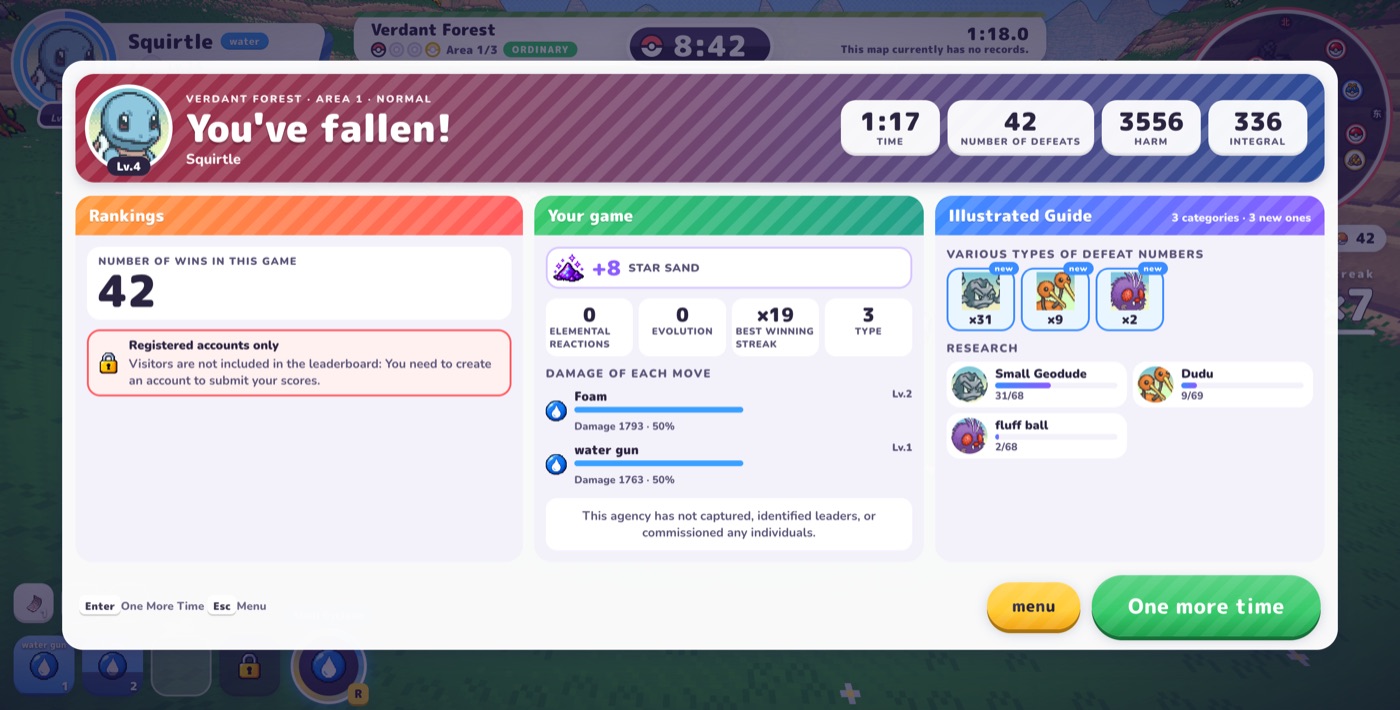
After a run, the panel shows time, defeats (KOs), total damage and a score. It lists your best winning streak, elemental reactions, evolutions, the reward (“Star Sand”), the damage of each move as a share of your total, and the research progress you made. Use the per-move split to decide whether to add another attack or improve your main one. A guest sees “Registered accounts only”: visitors are not included in the leaderboard. Observed, v0.7.2.
Simple upgrade rules (our reading, untested)
- Get a reliable first attack, then a second one that covers a different shape or range.
- Upgrade the move that does the most damage in the run summary.
- Compare total hits and cooldown, not only damage per hit: Foam’s card works out to about 28.8 raw damage a second (7.2 × 4 ÷ 1 s) against about 20.8 for Water Gun (18.7 ÷ 0.9 s), before hit rate and modifiers.
- Take healing or armor when your health is under pressure.
Frequently asked questions
What do I choose on my first level-up in PokéBonk?
Take a reliable second attack or an enhancement for the move you use most; each card shows the exact change, so compare the numbers before picking.
Can I see my moves while choosing a level-up?
Yes. Press Tab for “View my team” while the choice is open.
Do level-up choices last the whole run?
Yes. The card text says your choice lasts for the entire game, meaning the whole run.
Sources & verification
Sources: the game’s official patch announcements (api.pokebonk.com/news, Patches #1–#7 and the maintenance update, 15–18 Oct 2026, US Pacific Time), plus our own observation of the game in Beta v0.7.2 (Patch #7) on 18 Oct 2026. Card examples come from a Squirtle run in Verdant Forest; the numbers are the values shown on those cards. Each fact is labelled Official (from the announcements) or Observed (seen in the game UI). Patches overwrite one another, so numbers may have changed since; we have not re-measured every value. Mistake? support@pokebonkwiki.com
Related pages
- Play PokéBonk Free Online
- How to Play PokéBonk: Beginner Guide
- PokéBonk Starters: Bulbasaur vs Charmander vs Squirtle
- PokéBonk Lab Guide: Permanent Upgrades, Prices and Item Pool
- PokéBonk Items Guide: Rarities, Effects and Caps
- PokéBonk Economy Guide: Poké Balls, Meowth, Selling & Training
- PokéBonk Difficulty Guide: Normal vs Hard vs Nightmare
- PokéBonk Boss Guide: Fury, Exhaustion and How to Beat Guardians
- PokéBonk Clans, Friends & Co-op: How They Work (and What’s Coming)
- PokéBonk Patch Notes
- PokéBonk Wiki
Last updated: (US Pacific Time)