Pokebonk Move Learning: Sources, Slots and Matching Upgrades
Learn where Pokebonk moves come from, why an attack may not appear, how slots and upgrade tags work, and how status effects lead into reactions.
FAQ
How do I learn new moves in Pokebonk?
Why is Solar Beam not offered when Bulbasaur reaches Level 7?
Does Fourth option let me equip four moves?
Why does an upgrade say None of your moves use it?
Can a banished move still get level-up improvements?
How do new moves enter my build?
Check the source → meet its conditions → keep a slot free → choose the offered card. Your partner starts with its first kit move in the checked client. Later attacks enter a pool of possible level-up offers; they are not automatically awarded at each threshold.
| Move source | What the v0.8.55 client checks | What this means for your plan |
|---|---|---|
| Partner’s fixed kit | Its four kit positions use thresholds 0, 2, 4 and 7; the first move is given at run start | The later three become eligible at player Levels 2, 4 and 7 |
| Species and evolution line | The current species and its ancestors contribute supported learnset moves; the lowest listed level is used | This is a second source beyond the fixed kit, with its own eligibility calculation |
| League sharing | Another member must be in your League and share a current player type; the offered move must be Normal or match a current player type, and pass its kit-level threshold | Owning a League member does not make every one of its moves available to every partner |
New-move candidates also exclude already-owned and banished attacks. The generator checks whether the move has a supported implementation. Mew has a separate broad-pool branch; do not assume every partner follows an identical species-learnset rule.
For the ordinary species-line pool, the checked client compares the learnset level with player level × 2.6 + 10. That is an eligibility conversion, not the original Pokémon games’ promise of learning a move at a particular level. The fixed-kit thresholds use the separate rule above.
Which moves are in the three starters’ fixed kits?
These kit entries and thresholds were checked against the official v0.8.55 definitions on 2026-10-26. The later columns show when an attack can enter offers, provided a slot remains available.
| Partner | Given at start | Later eligible offers |
|---|---|---|
| Bulbasaur | Vine Whip | Lv. 2: Razor Leaf Lv. 4: Sleep Powder Lv. 7: Solar Beam |
| Charmander | Ember | Lv. 2: Fire Spin Lv. 4: Flamethrower Lv. 7: Fire Blast |
| Squirtle | Water Gun | Lv. 2: Bubble Lv. 4: Rapid Spin Lv. 7: Hydro Pump |
Use the starter comparison for each partner’s role and historical kit observations. The table here verifies current kit order, not damage values, best builds or win rates. An evolution-line or shared offer can compete with the fixed-kit moves, so filling every slot early may prevent a later attack from appearing.
How are move slots different from level-up offers?
| Capacity | Default in the checked client | What changes it |
|---|---|---|
| Equipped moves | 3 slots | The Lab’s 4th move upgrade increases capacity to 4 |
| Cards to choose between at a level-up | 3 offers | The separate Fourth option upgrade changes this to 4 offers |
An improvement to an equipped move uses that move’s existing slot. A vitamin uses the separate vitamin system. When move slots are full, the generator can still offer move improvements and vitamins, but it stops adding new-move candidates. The fourth slot creates capacity; it does not guarantee a fourth attack immediately.
For the two permanent upgrades and dated price evidence, see the Lab fourth-slot FAQ . Plan around the current in-game price rather than an old screenshot.
Which tags should match before I choose an upgrade?
The card’s element, damage class and attack shape answer different questions. A Fire move is not automatically Physical or automatically a projectile. Read the actual move card and the Affects list.
| Card detail | Match it to | Practical check |
|---|---|---|
| Element, such as Fire or Water | The element targeted by a type-specific bonus or reaction | A type bonus is not proof that a class-specific bonus also works |
| Physical / Special | Physical or Special damage modifiers | Protein targets Physical damage; Calcium targets Special damage in the checked definitions |
| Shape and supported stats | Projectile count, projectile speed, area or duration | The client checks whether that shape uses the relevant stat; a bonus can affect only part of your kit |
| Affects line | Your currently equipped moves | “None of your moves use it” means that targeted bonus has no matching equipped attack |
Some general stats have no move-specific Affects list. Its absence does not prove the card is useless. Compare the displayed stat change, your equipped attacks and your immediate survival needs. The level-up choice checklist gives a shorter decision routine; the build planner is a reference tool whose dataset version should be checked separately from this live-client snapshot.
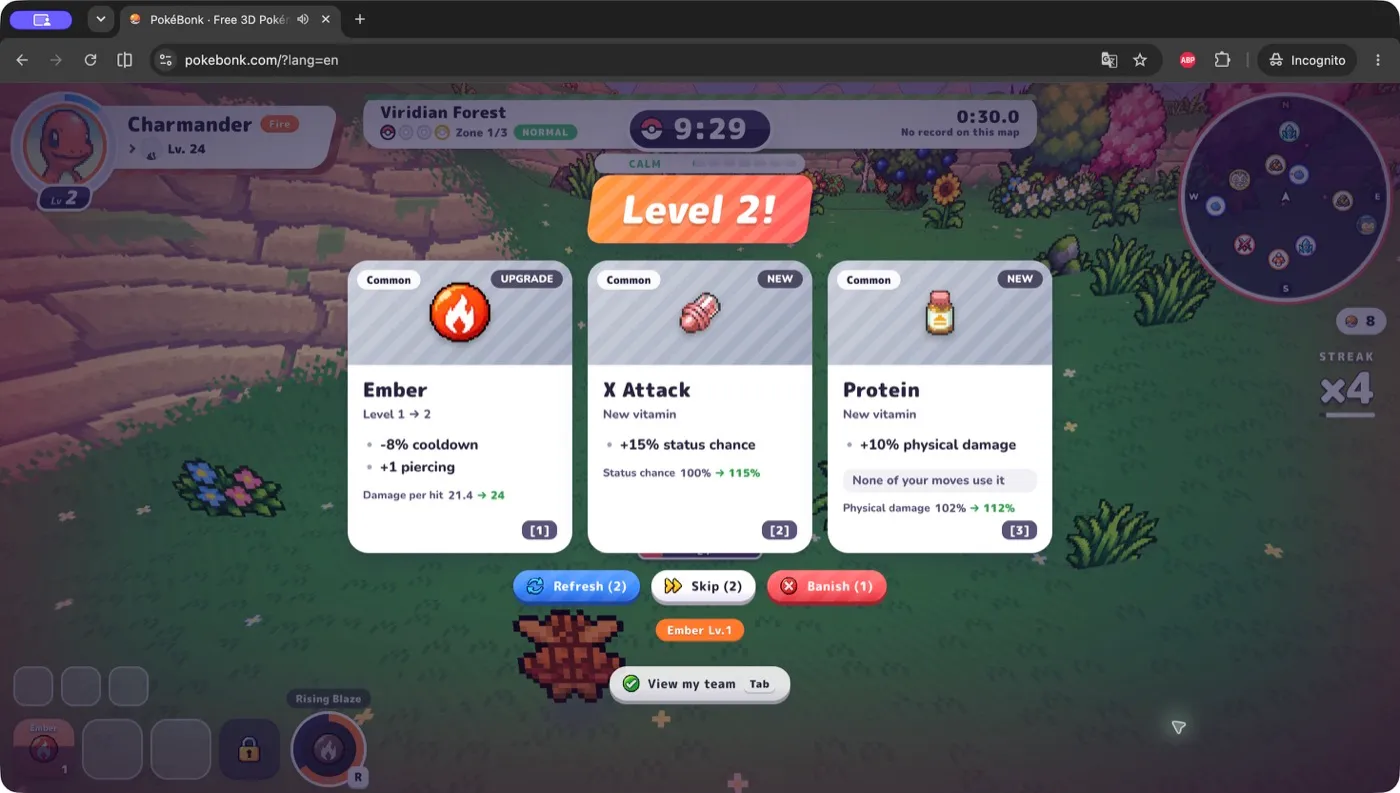
How do statuses connect two moves into a reaction?
The target’s existing status comes first; a compatible incoming hit triggers the reaction. An elemental move name alone is not enough: the relevant status must actually be active when the hit arrives, and the client’s reaction gate must allow it.
| Set up on the enemy | Follow with | Verified reaction branch |
|---|---|---|
| Wet | Electric hit | Electrocuted; consumes Wet and can chain to other nearby Wet enemies |
| Burn | Water hit | Steam; consumes Burn and applies nearby control effects |
These two ordered examples were checked in the current reaction handler. They do not establish that every Water attack always applies Wet or every Fire attack always burns. Consult the move’s actual status chance and effect. Reversing the order is not an equivalent recipe: the checked handler does not turn Wet followed by Fire into Steam.
As planning advice, combine a reliable status setup with a follow-up you can actually obtain and equip. That is a code-informed idea, not a tested damage ranking or a completed reaction-challenge route. The mechanics glossary contains the broader historical v0.7.3 status reference; its older figures have not all been revalidated by this guide.
What should I check when a wanted move never appears?
- Capacity: is there an empty move slot? Four offers do not create a fourth slot.
- Eligibility: is it a fixed-kit, species-line or League-shared move, and have its conditions been met? Check Still to get.
- Ownership and banishment: an already-owned attack is improved through its upgrade card; a banished move is excluded from both new-move and improvement offers.
- Random selection: an eligible move can still miss the current offers. Treat a planned later attack as a possibility, not a guaranteed reward.
For default refresh, skip and banish inputs, use the controls reference . Avoid banishing a move you want to improve later in the run.
What was verified, and what was not tested?
Checked on 2026-10-26: official version metadata reported v0.8.55, build mvob1c8t. The game client , shared definitions and English UI dictionary establish the offer sources, starter kit order, slot/offer distinction, matching predicates and two reaction branches described here.
Isolated checks exercised the official pool functions with synthetic move records, and the reaction handler with stubbed visual effects. Those checks verify branches, not real-run drop probabilities or performance. Not tested: a live run, purchases, account progression, all species’ move pools, fusions, co-op timing or device behavior. The screenshot remains a separately labelled historical observation. If the official version changes, read the current cards and pool panel before relying on these thresholds.
Related Articles
guides
Pokebonk Classic vs Survival: Modes, Unlocks and Milestones
Compare Pokebonk Classic and Survival: route goals, difficulty, map access, pacts and scheduled bosses, checked against the v0.8.55 client.
guides
Pokebonk Controls: Keyboard, Mouse, Touch and Key Bindings
Find Pokebonk's default keys, touch controls, aiming modes and rebinding steps, checked against the v0.8.55 client with device-test limits.
guides
PokéBonk Difficulty: What Should a Beginner Choose?
A simple first-run difficulty recommendation for PokéBonk, with version-aware notes about Classic and Survival.
Was this helpful?
Thanks for the feedback!